/ Healthcare Technology
What Is PACS? A Plain Guide for Clinics and Hospitals
PACS is more than a place to store X-ray images. Learn how a Picture Archiving and Communication System works, the problems it solves, and when a healthcare facility actually needs one.
Quick answer
What to know before reading further
- PACS (Picture Archiving and Communication System) is a system that manages medical images — storing, transmitting, and displaying them — so clinical teams no longer depend on physical films or scattered image folders.
- Healthcare facilities typically start feeling the need for PACS when examination volume grows, film storage runs out, or physicians need access to images from more than one location.
Process map
One examination, several checkpoints
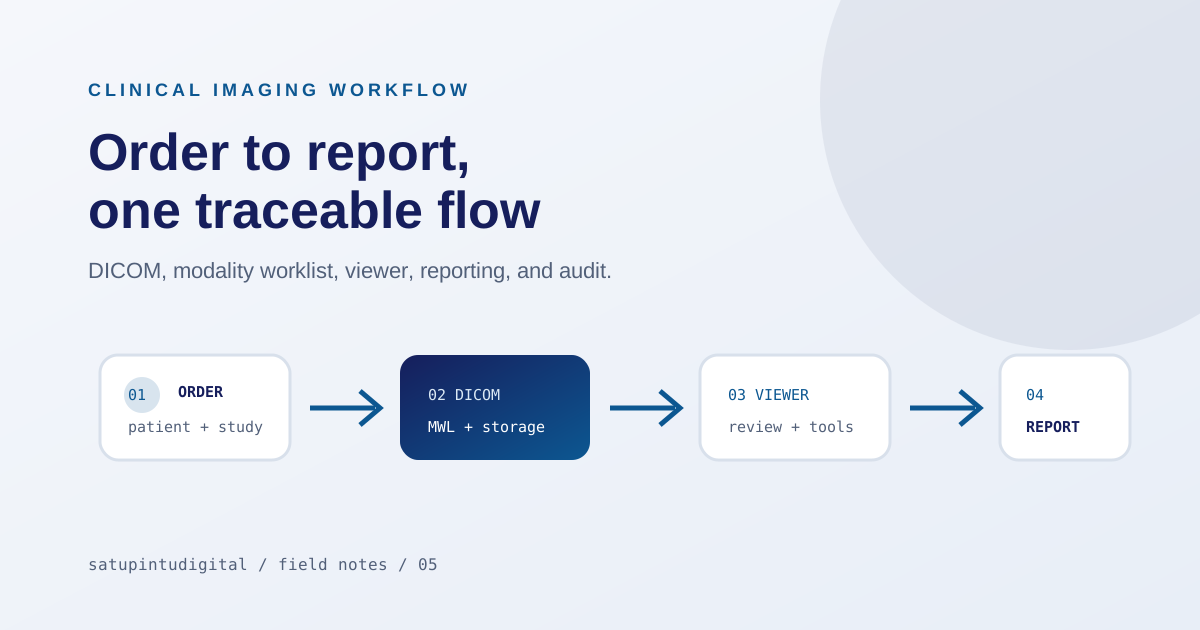
- 01
Patient registered
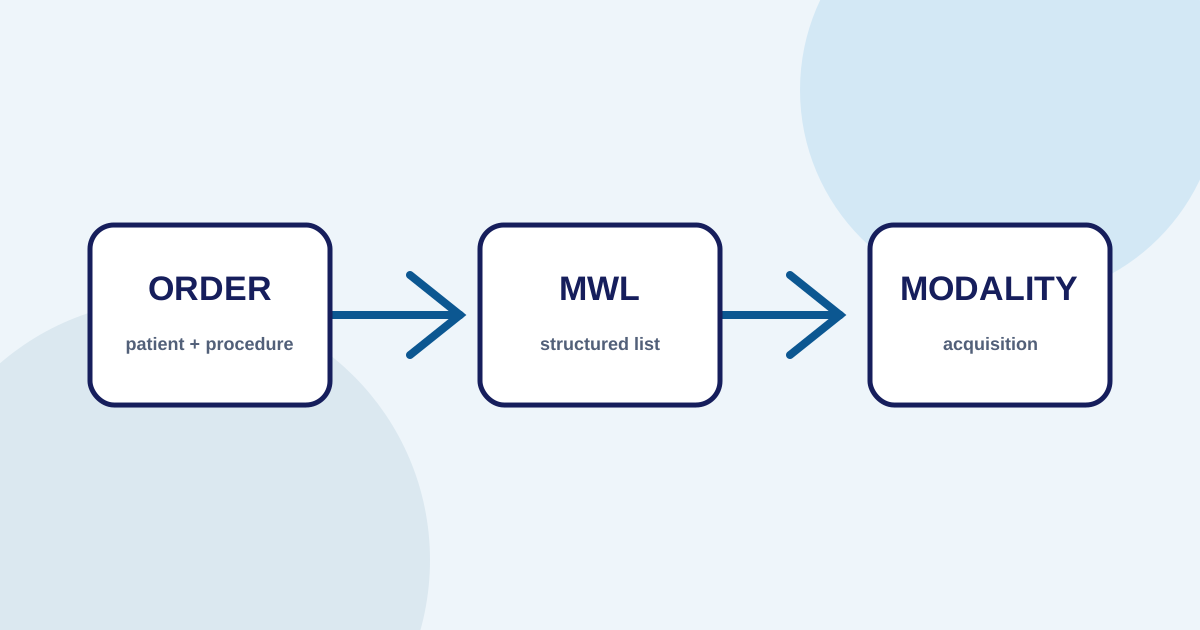
An examination order is created in the system, containing patient identity, procedure type, and priority.
- 02
Modality receives worklist
The imaging machine (CT, X-ray, etc.) retrieves the list of scheduled examinations. The technician selects the correct order from the machine's screen.
- 03
Images generated and sent
DICOM files from the examination are automatically sent to PACS storage, not saved locally on the machine.
- 04
Physician opens viewer
From any workstation, the physician opens the patient study through a DICOM viewer with the correct patient and procedure context.
- 05
Report created and finalized
The radiology report is written, reviewed, verified, and archived alongside the study data.
The problem before PACS existed
In many type C or D hospitals and clinics, radiology examinations still work like this: a patient is imaged, the result is printed on film, the film is handed to the physician, the physician writes a report on paper. If the result needs to be consulted with another physician, or the patient returns months later, someone has to physically locate that film — in a rack, an envelope, or in the patient’s own hands.
This isn’t purely a technology problem. It’s about how data moves — or fails to move — between the people who need it.
PACS was developed to answer the question that arises when examination volume grows: where is this image stored, who can access it, how does it connect to patient data and orders, and how do we ensure the physician’s report links to the correct study?
What is PACS, exactly?
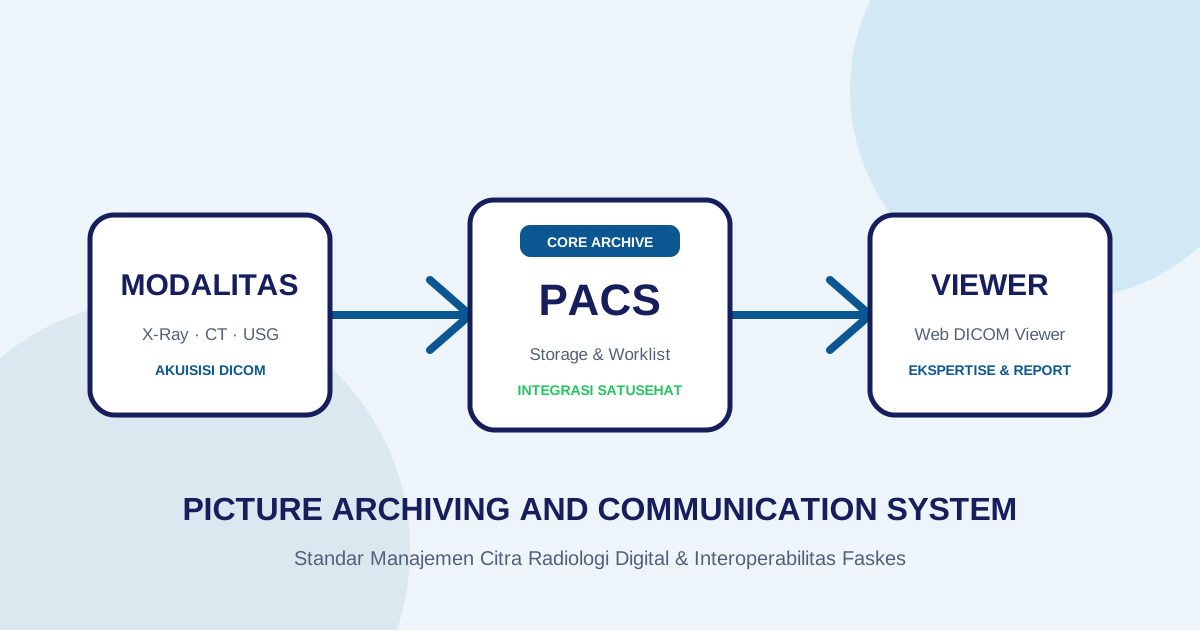
PACS — short for Picture Archiving and Communication System — is a system that manages digital medical images. It receives files from imaging modalities (CT scanner, X-ray, MRI, ultrasound), stores them, and makes them accessible through a viewer to authorized parties.
But PACS is more than storage. What distinguishes PACS from a shared network folder or hard drive is three things:
A communication standard (DICOM). All modern imaging devices use the DICOM format. PACS speaks the same language as a CT scanner from manufacturer A and an X-ray machine from manufacturer B. Without this standard, every device would require manual conversion before its data could be read by another system.
Patient and order context. Images in PACS don’t stand alone. Each study is linked to patient identity, order number, procedure type, and other relevant information. This means physicians don’t open an anonymous image — they open a specific patient’s study with the correct context.
Structured, auditable access. Who can view which studies is governed by access controls. Every file access, report modification, or significant action is logged. This matters for clinical accountability and regulatory compliance.
How does the workflow operate?
The basic workflow in PACS can be read as a chain of data movement and decisions:
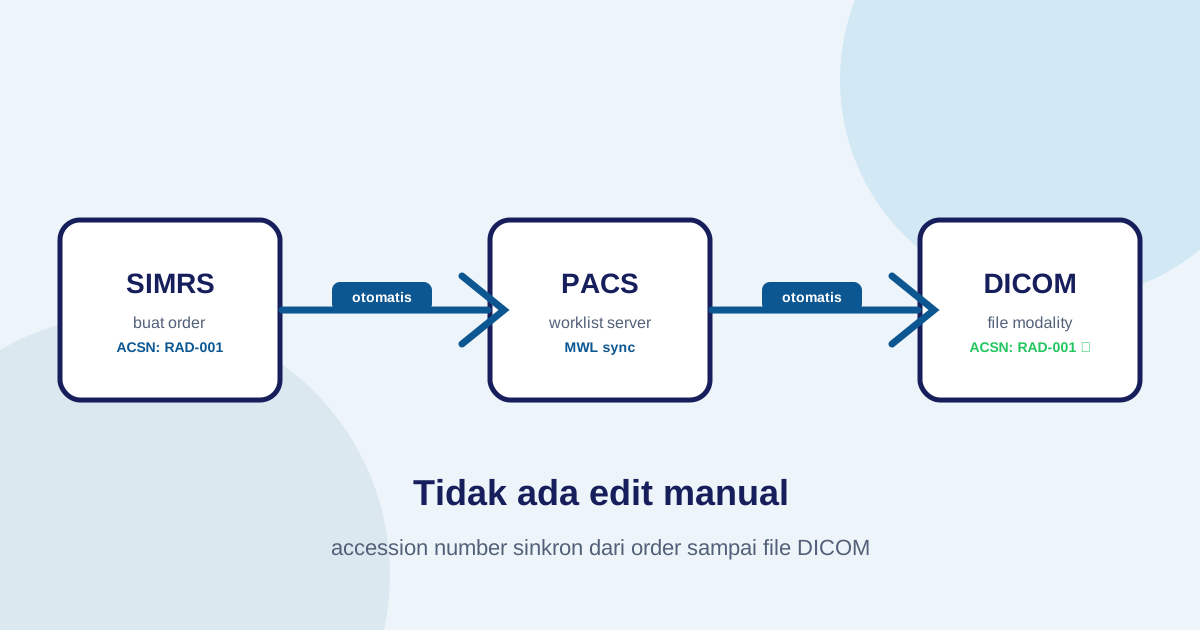
Order is created. A physician or administrator registers an examination. Patient data, procedure type, priority, and other information are entered into the system. An accession number — a unique examination identifier — is created or validated at this stage.
Modality receives the worklist. The imaging machine (CT, X-ray, etc.) retrieves the list of scheduled examinations. The technician selects the correct order from the machine’s screen, rather than manually typing the patient’s name and number into every machine. This reduces input errors and maintains data consistency.
Images are sent to PACS. After the examination is complete, DICOM files are automatically sent from the machine to PACS storage. This can happen over a local network or via cloud, depending on configuration. PACS validates metadata and stores files according to defined rules.
Physician opens the viewer. From a workstation — in the radiology room, physician’s office, or even remotely — the physician opens the patient study through a DICOM viewer. A good viewer supports windowing (contrast adjustment), measurement tools, and multi-series navigation.
Report is managed. The radiology report is written, reviewed, verified, and finalized. Report status can be tracked — which are still drafts, which are final — so no report gets “lost” or attributed to the wrong study.
Data is archived and integrated. Older studies remain accessible for comparison. If there are obligations to integrate with the national health platform (such as SATUSEHAT in Indonesia), data is submitted according to the agreed scope.
When does a facility actually need PACS?
There’s no fixed threshold, but several signals tend to appear:
Volume grows and film runs out. When physical storage for film becomes a constraint, or film printing costs begin straining the budget, transitioning to digital becomes a practical consideration.
More than one modality or unit. When a facility has a CT on one floor and an X-ray room on another, and physicians need to compare studies without moving between locations, PACS delivers real value.
Consulting physicians in different locations. Teleconsultation or second opinions require access to images without shipping physical film. PACS with a web-based viewer makes this possible.
Data integration obligations. Regulatory requirements or accreditation standards push facilities to have systems capable of reporting examination data to national platforms or electronic medical records.
Teams want to track examination status. When administrators, technicians, and physicians need to know whether a study has been received, is under review, or has been reported — without calling each other — PACS provides that visibility.
What needs to be prepared before implementation?
Selecting PACS without preparation is the fastest way to create a new system that nobody uses. Several questions need to be answered first:
Which modalities will be connected? CT, conventional X-ray, MRI, and ultrasound each have different file size characteristics. This affects storage and network bandwidth requirements.
Who will access it and in what role? Radiographers, radiologists, other specialists, administrators, and IT staff have different needs. Access control needs to be designed from the start.
Is there an existing HIS or SIMRS? Integration between PACS and existing information systems determines how smoothly patient identity and order data will flow.
What is the integration scope? Is this for internal use only, or does it need to connect to SATUSEHAT? This scope determines credential requirements, data mapping, and necessary testing.
What is the internal IT capacity? A good PACS implementation requires a team that can manage configuration, updates, and technical issues. If internal capacity is limited, this needs to be factored into the operational model.
One thing that is often misunderstood
PACS is not a clinical system. It does not replace physician judgment, does not write reports automatically, and does not validate diagnoses. PACS is infrastructure that helps data move correctly — from the machine to the physician who needs it, with the right context, at the right time.
This matters because failed implementations often aren’t due to the system being poor, but due to wrong expectations at the outset. Teams expect PACS to solve operational problems that actually stem from unmapped workflows, inconsistent data, or lack of ownership at each stage of the process.
Before a new system, map the existing workflow first. Find where data stalls, where errors repeat, and where the team most often waits. From there, the need for PACS (or another system) will be far easier to articulate.
Practical first steps
If you’re considering PACS for the first time, start small and concrete:
-
Choose one workflow to use as a case study. For example, the chest X-ray workflow from registration to completed report. Map every step and identify the real friction points.
-
Count volume and modalities. How many examinations per day? What is the average file size? This helps estimate storage and infrastructure requirements.
-
Identify stakeholders. Who needs to be involved — radiographers, physicians, administrators, IT, management? Each role has different needs and concerns.
-
Define the minimum scope for a pilot. A successful pilot is one that is small enough to control, but real enough to demonstrate value.
-
Ask about technical support and training. No matter how good the system is, it won’t be used if the team doesn’t know how to operate it, or if there’s no one to contact when problems arise.
Imagestro-PACS is a cloud-native PACS platform developed specifically for healthcare facilities in Indonesia — covering a web DICOM viewer, order and Modality Worklist (MWL) management, automated Accession Number modification, and seamless SATUSEHAT synchronization without setting up a local router server. If you would like to test it directly or see how it fits your facility, try Imagestro free or explore our Imagestro solution details.
Key terms
Quick glossary
- PACS
- Picture Archiving and Communication System — a system for storing, transmitting, and displaying digital medical images from various modalities such as X-ray, CT, and MRI.
- DICOM
- Digital Imaging and Communications in Medicine — the standard file format and communication protocol that allows imaging devices from different manufacturers to exchange data.
- Modality
- A medical imaging device such as CT scanner, MRI, conventional X-ray, or ultrasound that produces DICOM files.
- Worklist
- A list of scheduled examinations that a modality retrieves from the information system, so technicians don't need to re-enter patient identity on every machine.
Frequently asked
Questions teams ask before implementation
- Is PACS mandatory for all healthcare facilities?
- There is no universal mandate, but facilities with growing imaging volume, more than one modality, or obligations to integrate with national health data platforms generally consider PACS as part of their digital infrastructure.
- Is PACS the same as RIS or HIS?
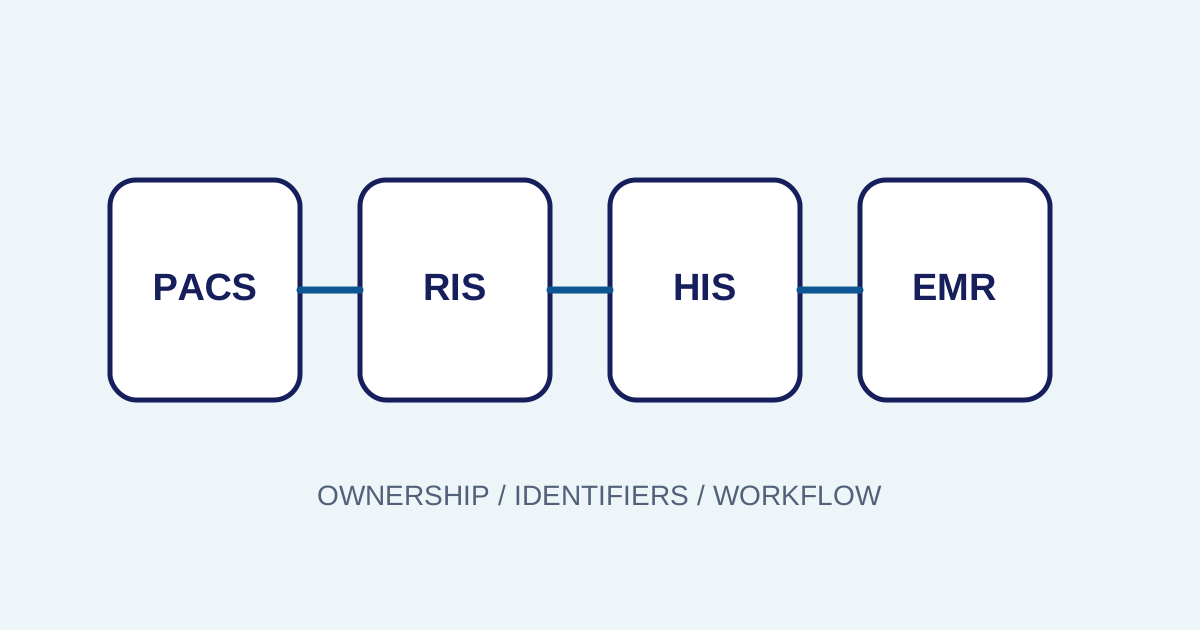
- No. PACS focuses on medical image management. RIS (Radiology Information System) focuses on administrative and clinical radiology information. HIS (Hospital Information System) covers overall hospital operations. All three can operate independently or be integrated.
- How long does a PACS implementation typically take?
- Duration varies depending on facility scale, number of modalities, network readiness, and integration scope. A small pilot can run within weeks; full implementation with HIS and SATUSEHAT integration requires longer planning.
- Can old data on physical films be migrated to PACS?
- Yes, through a film digitization process. However, this is a separate decision from the PACS implementation itself and needs to be planned as its own project.
Transmit Radiology to SATUSEHAT Without the Setup Hassle
Connect your clinical imaging workflow—from modality worklists and automated accession numbers to web DICOM viewing and SATUSEHAT synchronization. Free Tier available for clinics and hospitals.
Content cluster